
Most people use AI to summarize a document.
In an acquisition, the summary is the one thing you can't afford to trust.
If a model invents an EBITDA figure, or quietly rounds a churn number in the seller's favor, or softens a customer-concentration risk into something that sounds fine, that isn't a typo you catch later. It's the basis you priced a deal on. By the time you find out, you've signed the LOI, burned a month, and spent credibility you can't get back.
So I built a pack of agents the other way round. Not one big agent that reads everything and hands you a confident paragraph. Twenty small ones, each with a single job, each built to show its work, and to cite every factual claim back to the source it came from, or cut the claim before you ever see it.
It's called The Deal Team. It's MIT-licensed, free, and up on GitHub.
Why small acquirers feel this hardest
A two-person search fund reviews the same volume of CIMs, financials, and legal documents as a mid-market PE firm. Same teasers, same data rooms, same seven-figure decisions, minus the analysts, the associates, and the back office that institutional buyers take for granted.
That's where AI looks like an obvious win. And it is, right up until you remember that the failure mode isn't "the summary is a bit rough." The failure mode is a number that's wrong, stated with total confidence, that you can't tell apart from a number that's right.
Reading a CIM, tying it to the financials, and building a question list is days of principal time per target, most of it spent on deals that die. You want to move faster. You just can't move faster by trusting output you can't trace.
The fix isn't a smarter summarizer. It's a discipline: every figure traces back to a line in a document, or it doesn't get used.
What "cite or cut" actually looks like
The clearest demonstration isn't in the prompts, it's in a finished brief. There's a full sample brief on a synthetic target, "Project Sentinel," a fire-and-safety inspection business. It's worth opening because it shows the discipline doing the one thing a plain summary can't: catching a document contradicting itself.
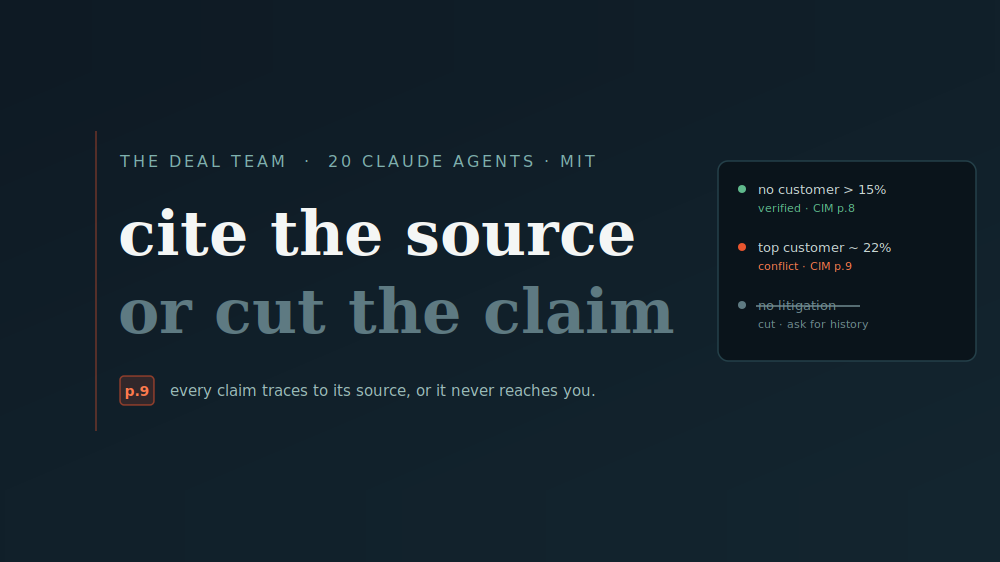
The CIM's page 8 says the customer base is well diversified, with no single customer over 15% of revenue. Page 9 of the same document lists the actual accounts, and the top one runs about 22% of revenue. Both pages can't be true. A model that just summarizes the CIM repeats the page-8 diversification line, and you price the deal on a concentration risk you never saw. The brief instead shows you both passages, verbatim, each cited to its page, and leaves the call to you.
Then there's the part most AI tools never show: the discard log. While drafting, the model produced the claim "the company has no outstanding litigation." Nothing in the documents supported it, so it was cut before it reached the brief and turned into an action instead: request a 10-year litigation history. Same fate for a tidy "average contract value of about $18,000" (couldn't be tied to any single sourced passage) and "technician retention is strong" (the CIM said nothing about turnover).
That's the whole philosophy on one screen. A verified claim shows its source. A contradiction shows both sides. An unverifiable claim doesn't reach you at all, it becomes a question.
What's actually in the pack
Twenty agents, ordered to follow a real deal across five stages. Feed the output of one into the next.
- Sourcing: build a focused target list, sharpen a vague thesis into something testable, and write owner-direct outreach that gets replies without sounding like a broker.
- Screening: read a teaser for what's really being sold, score it against your thesis in minutes, scan for the early red flags that kill deals later, and force a clean go/no-go so you don't drift into dead deals.
- Diligence: read a full CIM into a cited, plain-English brief, turn financials into signal, stress-test customer concentration, sanity-check the market story, and run a Citation Checker that audits any AI or analyst summary back against the source.
- Valuation: frame a range with comparable logic, sketch whether it works on leverage, and catch yourself before you overpay.
- Process and close: generate the diligence question list you'd have forgotten, prep a sharp management meeting, and turn the whole thing into a clean IC-style memo.
The full bench, all twenty, each with what it does, is in the README.
How to run them (about thirty seconds)
Each agent is a single SKILL.md with a copy-ready prompt. Two ways in:
Copy-paste, no setup. Open claude.ai, copy the prompt from any agent, paste it as your first message, then attach the deal: teaser, CIM, P&L, your thesis. For one you'll reuse, drop the prompt into a Claude Project's custom instructions and every chat in that project is that agent.
Install as Claude skills. Each folder under skills/ is self-contained. Drop the ones you want into your skills directory and Claude reaches for the right agent when you describe what you're doing:
git clone https://github.com/MariusGithub13/open-deal-kit.git
cp -r open-deal-kit/skills/* ~/.claude/skills/
The one habit that makes any of this safe
When an agent gives you a number that matters, check the citation it points to. Every figure should trace back to a line in your document. If it can't, treat it as unverified.
That single habit, check the source every time, is the difference between using AI on a deal and trusting it. The agents are built to make that check fast: they tell you where each claim came from, and they tell you when something they needed was missing instead of papering over the gap.
From prompts to product, the honest version
I'll be straight about where this ends and where my product begins, because pretending otherwise would undercut the whole "cite it or cut it" point.
The agents give you the discipline: a prompt you run yourself, one document at a time, checking each citation by hand. That's genuinely most of the value, and it's free forever. If you only ever use the prompts, that's a win, they're yours, MIT, no strings.
The by-hand part is also the part that stops scaling. One agent, one document, one manual citation check is fine for a single target. Across a live data room, a CIM, three years of financials, tax returns, a QoE, a stack of contracts, all of which have to agree with each other, the checking is the work, and it's the work nobody has time for.
That's what I built Deal OS to do automatically: read a whole data room at once, verify every citation against the source, discard the claims it can't verify before you ever see them, and flag contradictions across documents, where the CIM, the financials, and the management call disagree, instead of you running a checker over each pair by hand.
If you're running one deal, use the prompts. If you're running several and the manual checking has stopped scaling, that's where the product earns its place, and it's worth understanding how this category of due diligence software differs from a virtual data room before you buy either. You can read a full source-cited brief on a sample deal before deciding either way.
One honest note
These are analytical tools to speed up your own judgment and help you read deals faster. They are not investment, legal, tax, or accounting advice, and they don't replace your own verification or your advisers. Always check an agent's output against the source documents, which is exactly what the cited rule is designed to let you do.
If the "cite it or cut it" idea is useful to you, the best thing you can do is star the repo so the next searcher who's drowning in CIMs finds it too. Fork it, adapt the prompts to your own thesis, and tell me which agent earns its keep and which one needs work.
Compiled by Marius Andronie, Devaland, Deal OS.